



Stay informed with news, updates, and best practices on the ParentSquare blog.
Explore
Core Platform

Solutions for every role in your school community
See how we solve real challenges facing schools
Insights and ideas that add value to districts
A centralized hub for expert help and guidance

A practical guide for schools and districts to drive ongoing attendance improvement
For district and school leaders, managing attendance usually involves juggling two very different priorities: aligning with strict state-mandated requirements for tracking and communication while addressing the complex, deeply-rooted causes behind absenteeism.
Schools often find that relying only on “traditional” compliance interventions, like automated calls, notices, or truancy letters, can have the unintended effect of alienating the same families they need to reach. Instead, districts need to balance meeting necessary standards with providing support and connection for families facing attendance challenges.
That’s where your attendance team can come in. An attendance team is a dedicated committee of staff — often counselors, teachers, administrators, nurses, and community partners — who work together to keep students in class. When roles are clearly defined and responsibilities are shared, teams can do what no single individual can: spot trends early, intervene compassionately, and build lasting connections with families.
And when those teams use ParentSquare Attendance Plus, they don’t need to build processes from scratch. Instead, they’ll be equipped with real-time data, communication tools, and a way to track interventions that let them act faster and smarter.
In this guide, you’ll learn how to:

Every strong initiative starts with people. Before you can tackle absenteeism, you need the right people in the room and the right roles at the table. A well-rounded attendance team is more than just a checklist of job titles; it’s a collaboration of perspectives, skills, and relationships that, when combined, can make attendance improvement both sustainable and compassionate.
An attendance team is your school’s frontline defense against chronic absenteeism, but more importantly, it’s a dedicated support system built on empathy and solutions for students and families.
By bringing together different voices (administrators, counselors, teachers, nurses, and even community partners), teams can:
Collaboration that drives action
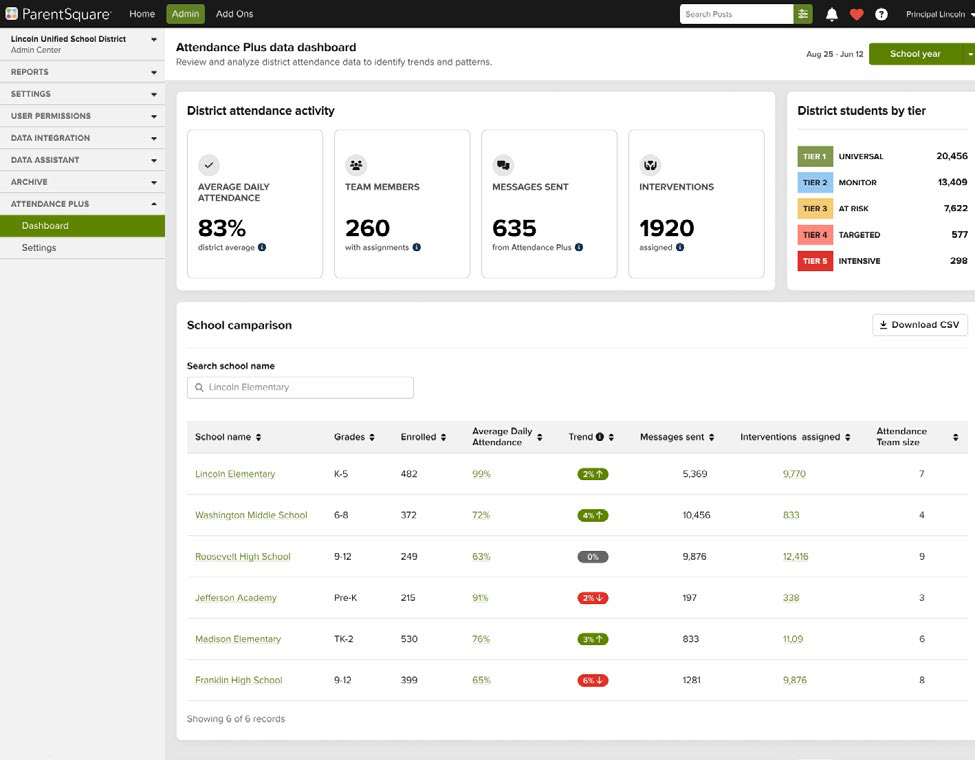
When teams use ParentSquare Attendance Plus, they don’t need to build processes and systems from scratch — they’re equipped with attendance data, communication tools, and tracking interventions that let them act faster and smarter. ParentSquare Attendance Plus also makes it easier for every role to collaborate with role-based access and shared intervention tracking, so no student falls through the cracks.
“The transparency alone has changed how we work. Now we can see what’s happening at every school and respond as a team.”
Tip: Keep teams manageable. The key is consistency and collaboration, not size.
Scalable from schools to districts
ParentSquare Attendance Plus helps support attendance at both the school and district levels, with tools and workflows that give superintendents and leaders visibility into attendance trends while empowering every site team to take action.
Start by framing attendance as a shared responsibility, not just one belonging to clerical staff. Invite people who care deeply about students, are willing to collaborate, and bring unique insights. Participation takes time, so celebrate team members’ efforts and highlight successes regularly. A little recognition goes a long way in keeping motivation high.
When you have the right people in place, you’ll notice a shift in conversations from “What’s wrong with these students?” to “What can we change to help them succeed?” When this happens, you’ll know that you’ve built not just a committee, but a team.
Once your team is set, the next challenge is making sure that everyone shares a common purpose. This starts with a strong launch.
Building your team is only the first step. Making an impact takes developing a shared vision, clear expectations, and a sense of urgency. While this may sound like a daunting task, it’s absolutely possible to create alignment with focused, purposeful team training.
This section outlines a half-day training framework that you can use with your attendance team. Think of this training as a foundational playbook. It doesn’t need to be fancy or overwhelming, but it does need to set a clear tone and communicate that your team is in this together, that you know why it matters, and that you have a plan to act.
Objective: Ground the team in why attendance matters.
Objective: Build a shared understanding of your current environment.
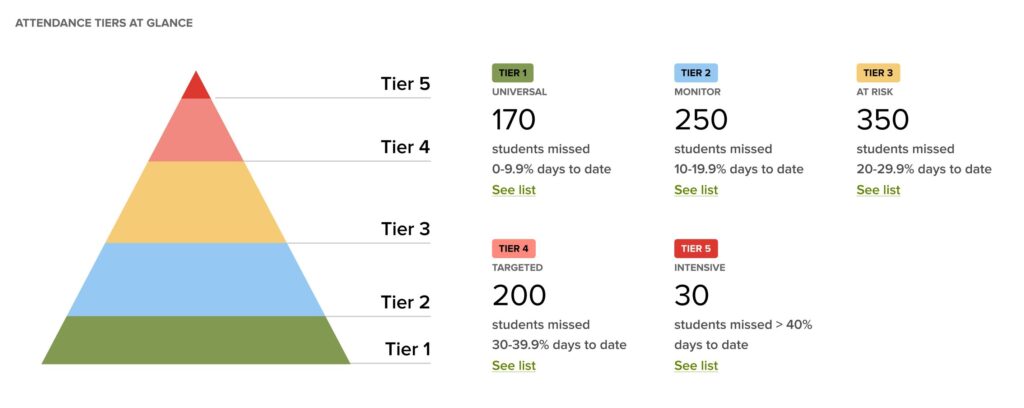
Tip: Keep the data simple. Use visuals like charts or tiered breakdowns in ParentSquare Attendance Plus rather than long spreadsheets.
Objective: Shift the conversation from blame to barriers.
Objective: Build confidence before real outreach begins.
Supportive conversations made easier
Many staff members hesitate to call families because they fear conflict. Practicing together helps normalize compassionate, non-judgmental conversations. ParentSquare Attendance Plus makes this even easier with pre-built outreach scripts in families’ preferred languages, so staff feel confident making equitable, compassionate contact.
Objective: Leave training with a concrete plan.
Keep the work going without the busywork
ParentSquare Attendance Plus automatically tracks interventions and outcomes, so your team knows what’s working and what needs revisiting. Plus, you can keep momentum going without juggling spreadsheets or duplicating efforts.
By the end of training, your team should not only be informed but also energized. With SMART goals, role clarity, and tools to track progress, they’ll be ready to shift from planning to action. This clarity is what turns good intentions into concrete results.
Now that the team has direction, the next step is to implement tiered strategies that provide the right level of support for every student — from broad encouragement to targeted, intensive intervention.
Once your team is formed and trained, you’re ready to get started on strategic implementation. Attendance challenges look very different from student to student: some may need encouragement, while others face serious systemic barriers. To support this range, teams often rely on a Multi-Tiered Systems of Supports (MTSS) to address attendance and other student needs. This framework can help keep your strategies both equitable and targeted.
Think of tiers as widening circles of support: everyone benefits from Tier 1, some need Tier 2, and a few require intensive Tier 3 interventions. This approach prevents teams from spreading themselves too thin and helps allocate resources where they’ll make the most impact.
Tier 1 strategies are designed for all students and families, setting the foundation for a school-wide culture where attendance is both valued and celebrated.
Examples of Tier 1 strategies:
Pitfalls to avoid: Don’t make celebrations exclusive to “perfect” attendance only. Be sure to also recognize progress, such as improved attendance streaks, so students who are trying don’t feel left out.
Tier 2 strategies focus on students who are beginning to show attendance concerns, providing targeted outreach and support to strengthen relationships before patterns become chronic.
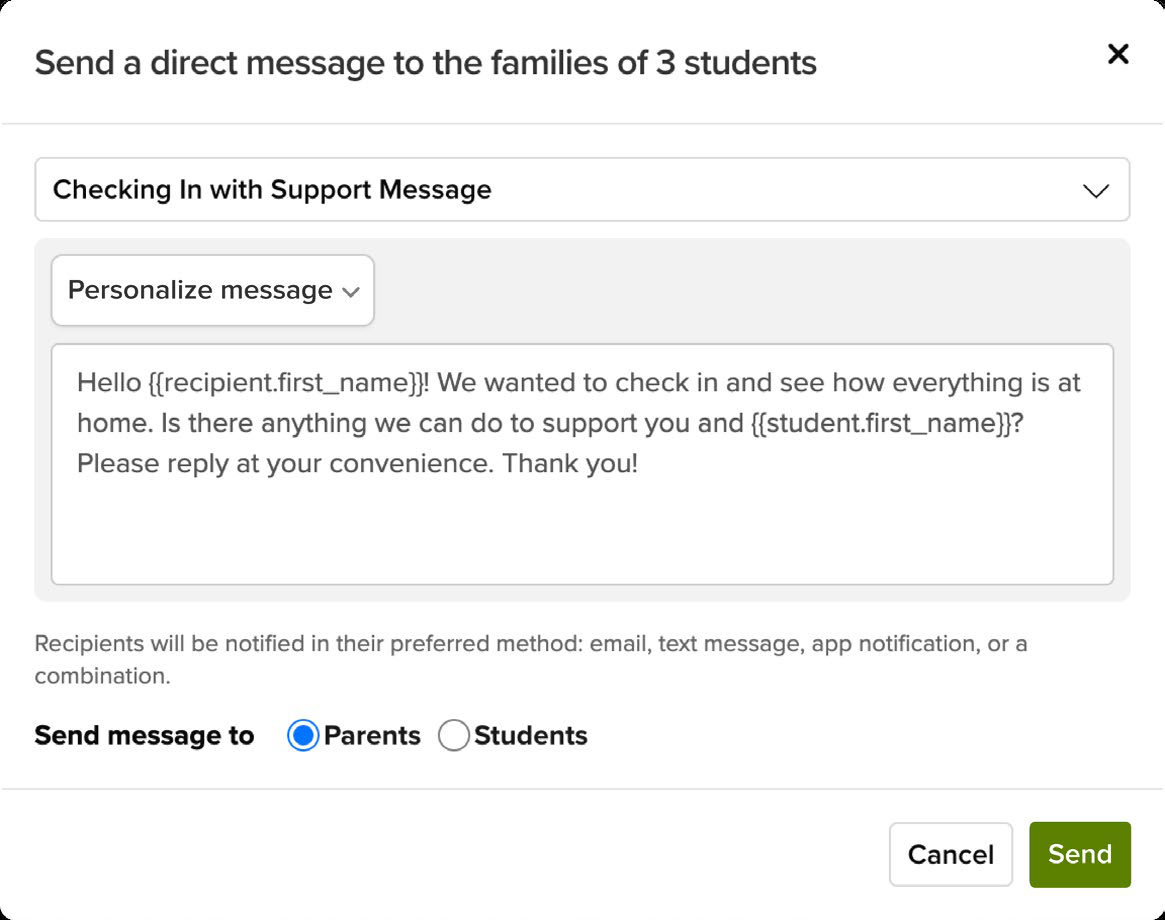
“Our attendance clerks start each day with a clear view of who needs outreach and why, and they can act immediately—sending personalized, multilingual messages from the same platform families already use and trust. We’re seeing stronger engagement, quicker interventions, and real improvements in daily attendance.”
Examples of Tier 2 strategies:
Pitfalls to avoid: Avoid sending only generic letters or automated messages. At Tier 2, families need personalized communication that demonstrates care.
Tier 3 strategies are for students missing 20% or more of the year and who require interventions such as individualized plans, home visits, and community services.
Examples of Tier 3 strategies:
Pitfalls to avoid: Don’t rely on punitive measures such as suspension for truancy because they often worsen the problem. Keep the focus on support and solutions.
When schools adopt this tiered approach, the work feels less overwhelming and more strategic. Instead of chasing every absence in the same way, teams can focus on what works for each group of students. Once those strategies are in place, the key to sustained change is follow-through and keeping the momentum going month after month.
Why tiers work with ParentSquare Attendance Plus
Managing a tiered intervention strategy can be overwhelming without the right tools. ParentSquare Attendance Plus is designed to help teams keep track of moving parts:
Launching an attendance initiative often begins with energy and optimism. The challenge comes later when staff have to sustain the effort week after week while balancing everything else on their plates. Teachers, counselors, and administrators already have full workloads, so follow-through needs to be structured in a way that makes the work manageable and sustainable, not just one more thing to juggle.
To keep the momentum going, attendance teams need structures that create accountability, track progress, and make reflection a part of their everyday routine.
Turn plans into action with task lists
Attendance work often breaks down after interventions are assigned but before they’re completed. ParentSquare Attendance Plus includes task lists to give every attendance team member a personal workspace to manage their assigned students and interventions, including the ability to:
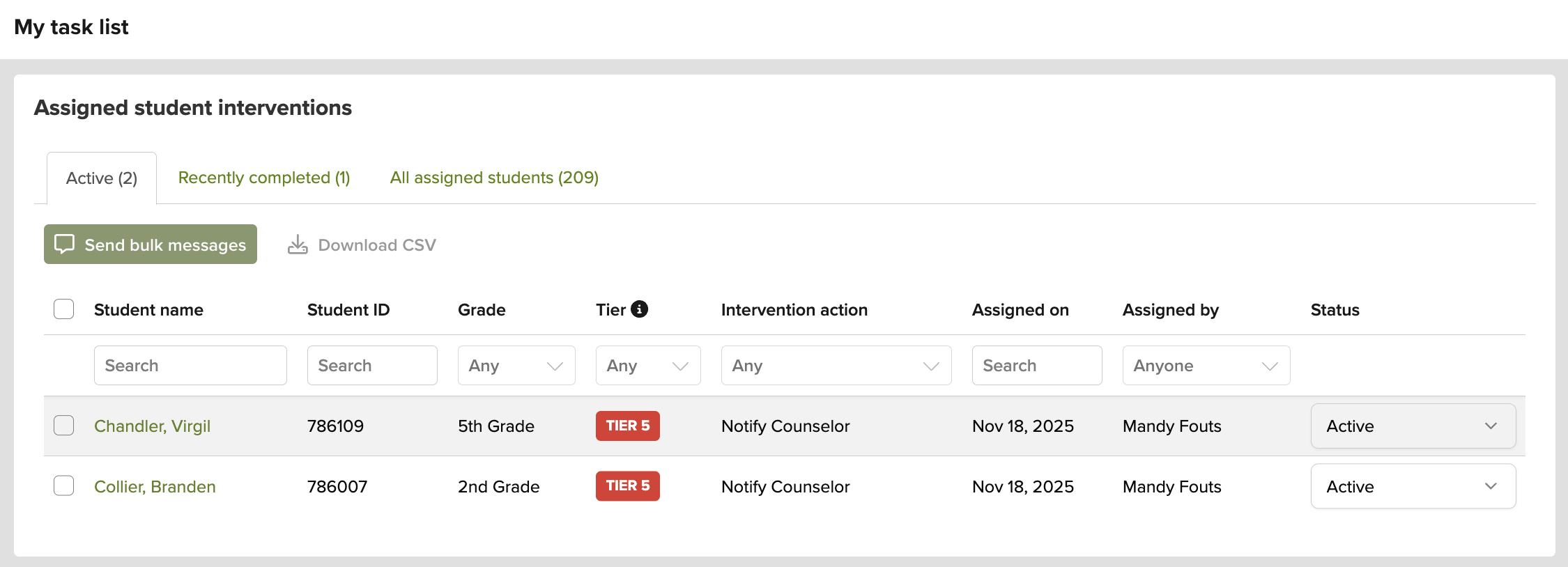
For administrators, task lists also support clearer delegation and better follow-through by improving visibility into what’s completed, not just what’s assigned.
Along with day-to-day follow-through, lasting attendance improvement also depends on shared routines and planning tools. Regardless of what systems you use, the resources below can help keep your work consistent, measurable, and sustainable.
This 30-day plan provides a clear, week-by-week roadmap for your school’s attendance team to establish a strong foundation, set goals, and begin impactful work. Use this plan to help your team move from initial setup to proactive outreach in just one month.
The first week is all about building the team’s structure and understanding the challenge.
Tip: If you use ParentSquare Attendance Plus, use the School Overview Page to review your attendance pyramid and percentage of students in each tier.
In the final week, reflect on what you’ve learned and adjust your strategy as needed.
This worksheet is designed to help your school’s attendance team create clear and actionable goals to improve student attendance. Use the SMART framework to define your objectives and plan your strategies for the academic year.
[YOUR SCHOOL NAME]’s GOAL — Overall goal: Describe your main objective for student attendance this year. What is the key outcome you want to achieve? Example: To reduce chronic absenteeism among all grade levels by 10% by the end of the school year.
This checklist is a quick self-assessment to help your attendance team evaluate its current processes. Check off each item that your team has in place.
By going through this checklist, your team can quickly see where your systems are strong and where you might need to add more structure.
ParentSquare is the leading family engagement infrastructure helping K-12 districts nationwide reach every family with an award-winning, all-in-one communication platform. Reaching over 22 million students nationwide, ParentSquare helps districts consolidate disconnected tools and outdated communication systems with personalized messaging, websites, forms, payments, and more — in one easy-to-use platform. With powerful features for achieving 100% contactability, two-way translation into 190+ languages, and purpose-built AI enhancements, ParentSquare empowers districts to invite every family to be involved in their student’s education, no matter their home language or the device they use.
Recognized for growth and innovation by Inc. 5000, GSV 150, and more, ParentSquare was founded in 2011 in Santa Barbara, California. Learn more at parentsquare.com.