



Stay informed with news, updates, and best practices on the ParentSquare blog.
Explore
Core Platform

Solutions for every role in your school community
See how we solve real challenges facing schools
Insights and ideas that add value to districts
A centralized hub for expert help and guidance


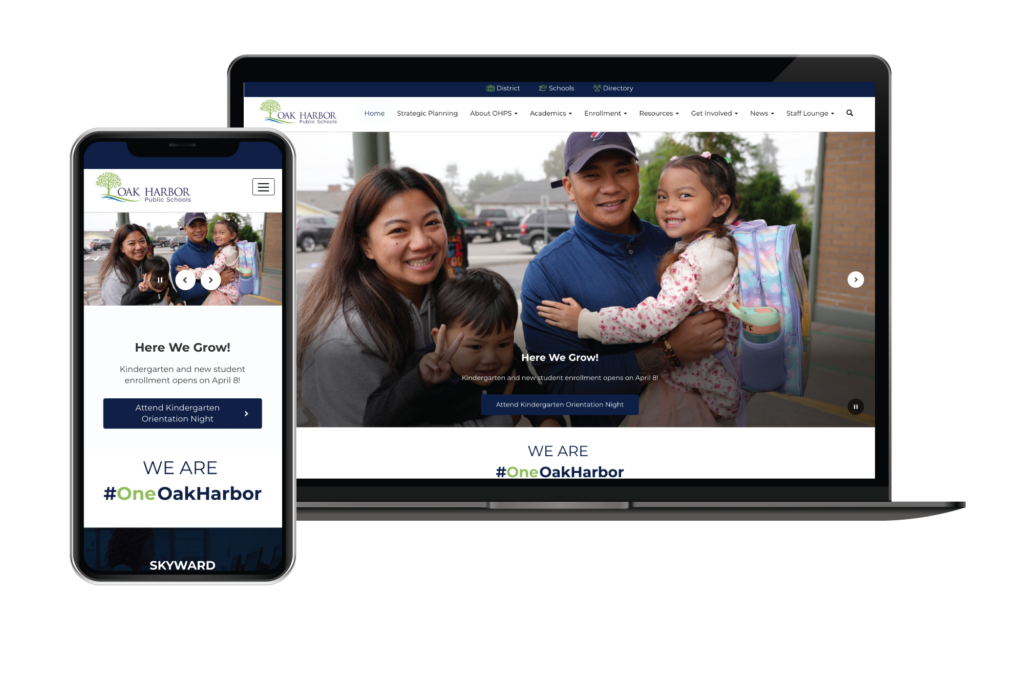
Oak Harbor Public Schools was already implementing ParentSquare for school-home communications when it saw an opportunity to address its aging website, which required technical expertise for simple updates and no longer met its communities’ needs. With ADA compliance and mobile responsiveness as top priorities, the district rolled out Smart Sites for a user-friendly, branded web presence integrated with its communication platform.
Situated on a large island about 60 miles north of Seattle, Oak Harbor Public Schools of Whidbey Island, Wash., serves a high number of military families as well as special education and special needs students who comprise about 19% of the student body. The island is connected to the mainland, but its remote location presents some unique challenges for the 5,500-student district.
Like many school districts, Oak Harbor Public Schools had a website that was set up years ago and used regularly by administrators, teachers, families, and the broader community. However, the site was in need of an upgrade and improvements. “It’s kind of like when you have a beautiful garden that’s overgrown with weeds and you don’t know what to do with it,” said Lisa Jones, communications specialist.
The district was already implementing ParentSquare’s feature-rich platform for all school-home communication, so they decided to roll out the new Smart Sites school website solution as part of the project. The tool integrates with ParentSquare’s family engagement platform to create a single platform for all communications.
Oak Harbor Public Schools onboarded ParentSquare during the summer of 2023 and went live on July 1 with their Smart Sites website. “Our communications officer came from a California district that used ParentSquare and raved about it as a communications platform,” says Jones. “After vetting some different platforms, we moved forward with ParentSquare and took advantage of Smart Sites.”
Jones said Smart Sites helped the district rethink the goals for their website and figure out ways to improve the existing site. “It really gave us a clean slate when it came to accessibility,” she explained. “Instead of trying to implement different applications on top of something that already existed—and clean up things we probably didn’t even need in the first place—we were able to start from the ground up and build our way into a better system overall.”
According to Jones, the district’s site editors, who work from the different schools, particularly appreciate Smart Sites’ user-friendly interface and ease of use. “We have people at different technology skill levels touching the website,” said Jones. “It was very easy to train everyone on how to do everything from quick text updates to more involved tasks.”
“It was very easy to train everyone on how to do everything from quick text updates to more involved tasks.”
These user-friendly features were a must-have for the district, which didn’t want to have to use HTML coding to make simple edits to the website. Smart Sites squarely checked that box. Another key point was the seamless integration between Smart Sites and ParentSquare, which allows users to post once on ParentSquare and automatically upload the post to the district website. “That’s been critical for us for sharing our messages,” said Jones.
Now, the district has a website that features an updated calendar, high-quality photos, and easy navigation. “People can find things quickly without having to search all over the website to find the information they need,” said Jones. In case of a weather alert or other emergency, Oak Harbor Public Schools can use pop-up alerts to quickly broadcast the important information on the district and school sites simultaneously, in conjunction with sending emails, text messages, push notifications and phone calls from ParentSquare.
Branding is very important to Oak Harbor Public Schools, which wants people to feel connected to the district across all touchpoints. Jones said having a modern, engaging website supports this goal and ensures that the materials being presented reflect a consistent brand message.
Today, the district’s logo and colors are prominently featured on the website, which also displays the logos and colors of individual schools. “Smart Sites shows that we’re all tied together,” said Jones. The webpage content itself, which is published both on the district’s site and across all school sites, is similarly cohesive.
“I can publish a write-up stating, ‘This is what we have to say as a district about attendance’ and put that into a page that appears on every school website, so they all use that unified messaging,” said Jones. “Then, Smart Sites helps us cover the bases by also allowing schools to add their own individual content as well.”
The district also has a new “Get Involved” area on the site focused on family involvement and engagement. “It was a conscious decision to make that a navigational point on the site, and we continue to expand on that,” Jones said. “We also have a fairly comprehensive news section for both the district and individual schools. This section posts newsletters, social media feed content, and other types of information that our families and community have come to rely on.”
Today, Oak Harbor Public Schools’ website is mobile-responsive and ADA compliant, both of which were top priorities for the district. “As a school district, we’re bound by federal laws and guidelines,” Jones said. “It’s very important that we have a website that everyone can access and use.”
The new site is also highly customizable, and the Smart Sites platform is continually adding new components and incorporating customer feedback. “The team is always trying to find new ways to make it work even better for us,” said Jones. “It’s been really nice to work with them on that level.”
For example, districts can use Smart Sites to develop and use intranets—something that Oak Harbor Public Schools is considering implementing in the future. “Even if we haven’t fully taken advantage of all of the bells and whistles that Smart Site has to offer,” Jones said, “we know that there are features that we can grow into if we want to.